We’ve been reviewing the Samsung Galaxy Nexus over the past ten days and there is one thing that has particularly struck me when using the phone. The Galaxy Nexus has a very nice 4.65-inch 1280×720 resolution Super AMOLED display. With a pixel density of 316dpi, text and photos are very crisp, it’s practically impossible to distinguish between individual pixels. Nevertheless, the display’s color temperature seems to be slightly off, this is especially visible when viewing large white blocks and when brightness is lower. It is easier to spot when the Galaxy Nexus’ screen is viewed side-by-side with another display. You also have to look at the screen more-or-less head on, looking at the Nexus’ screen at an angle gives it a blue tint, similar to the Nexus S and other AMOLED displays.
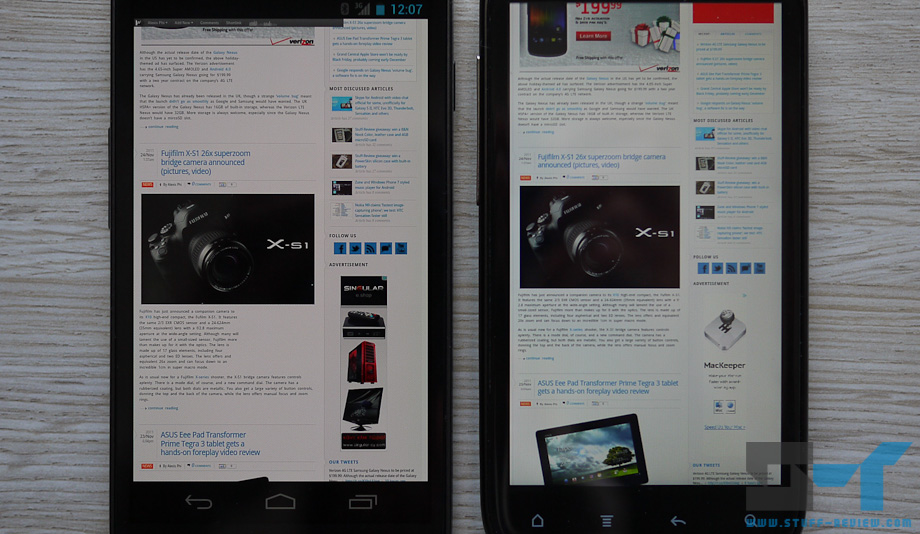
In the image above (click to enlarge), the Galaxy Nexus is on the left, while on the right we’ve included for comparison an HTC Sensation featuring a 4.3-inch Super LCD display. There is a subtle but distinguishing difference between the two screens, the Galaxy Nexus’ whites have a yellow/orange tint. The shots were taken at a display brightness of around 80% for both smartphones. Setting the Nexus’ brightness higher reduces the effect (although even at maximum brightness whites still have a yellow tint), while putting it lower increases it. At low brightness, whites are a shade of yellow tinted grey.
Below is another photo with the Galaxy Nexus, now on the top, and the HTC Sensation at the bottom, on the right we’ve included a white balance target used when taking the pictures.
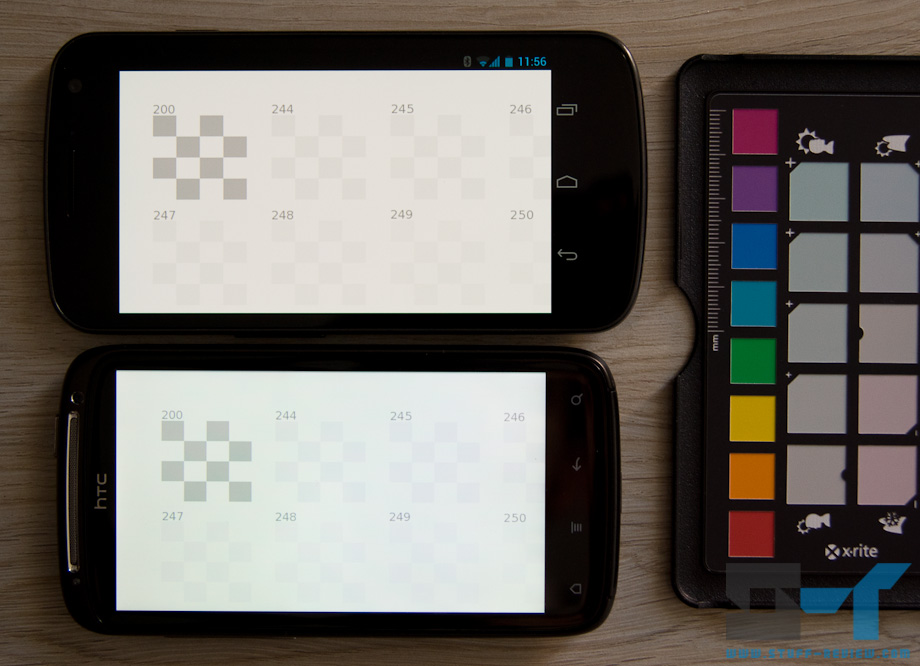
We are not sure if this is because of miss-calibration of the screen, an issue with translating RGB colors to the PenTile Matrix RGBG configuration or if this was done intentionally to save power — bright whites would mean that all color subpixels should be at maximum brightness. My guess is that the color temperature was unintentionally set warmer.
The issue doesn’t stop with white or grey shades. Looking at images on the Galaxy Nexus, there seems to be a general color shift. The below image shows the Nexus on the right, and you might be able to notice that the cyan color has a slight shift to green. In general, although AMOLED screens have punchy colors, their color accuracy has been inferior to IPS LCDs, as they tend to oversaturate.
Now, this might be something easily fixable through software, i.e. an issue with miss-calibration of the screen, or there could be something wrong with the particular unit that we have been testing. Although, looking at a number of videos posted of the Galaxy Nexus, we could easily determine that this is not an isolated issue.
On the flip side, blacks on the Galaxy Nexus are deep, fast refresh rates mean videos are super smooth, and the intensity of the colors is impressive. We would also think that most people wouldn’t even notice this slight yellow/orange tinge or the slight color balance shift, and for many it would be a non-issue.
It’s certainly not a deal breaker, but something you might want to consider before taking the plunge. We’re covered the Galaxy Nexus’ display in more detail in our complete review of the device which you’ll find by following this link. Personally I prefer color temperature on the cooler side.
We’d love to hear your opinions. Are you seeing something similar with your Nexus? Is it an issue for you or are you happy with the screen as it is?