Stuff-Review

  • Become our Facebook friendBecome our Facebook friend
  • Follow @stuffreview on TwitterFollow @stuffreview on Twitter
  • Subscribe to our YouTube channelSubscribe to our YouTube channel
  • See us on FlickrSee us on Flickr
  • Enjoy a more intimate experience on our TumblrEnjoy a more intimate experience on our Tumblr
  • Subscribe to our article RSS feedSubscribe to our article RSS feed
  • All
  • News
  • Reviews
  • Featured
  • Guides
  • Editorials
  • The Lab
  • Contact / Tip Us
  • RSS Feed

Connecting the Galaxy Nexus to your computer via MTP and the lack of USB Mass Storage
Guides

  • December 10, 2011 at 5:41 am

12

For better or worse, Google has been pushing to abolish microSD card slots from Android devices. Some of the reasoning behind this move revolves around making making the experience easier for beginners, i.e. not having to worry where apps will be installed, applications breaking when you remove the SD card or having to download and use a file manager. Of course this goes against rightly disgruntled advanced users who’ve been used to the convenience of expandable external storage.

The Galaxy Nexus (read our full review here) is Google’s brainchild, proudly becoming the first Android device to run version 4.0 Ice Cream Sandwich, and as such, it does not have a microSD card slot. Moving the external storage discussion aside, there is one specific functionality that’s become collateral damage. That is USB mass storage. To clarify here, Ice Cream Sandwich has support for USB mass storage but the Galaxy Nexus doesn’t.

USB mass storage is the protocol that allows your computer to view any USB device as a normal storage drive, i.e. gives it a drive letter and you can open it with Windows Explorer or Finder on Mac OS and transfer files and folders as you would with any other drive. If you’ve ever connected a USD thumb drive to a computer and browsed its contents, then it was using USB mass storage. USB mass storage allows block level access, i.e. ‘complete access’ to a storage device. As the Galaxy Nexus has one, unified, built-in storage which hosts both the Android operating system and your personal files it was impractical (if not impossible) to permit block level access on that storage.
continue reading

    • Recent
    • Popular
    • Comments
    • Fujifilm X100S digital camera with the wide conversion adapterFujifilm X100S camera announced with fast AF and new 16.3MP X-Trans II sensor (hands-on video)January 6, 2013
    • Sony Nexus X back leakSupposed Sony Nexus X images leakOctober 15, 2012
    • ASUS Padfone 2 smartphone and tablet dock leakAsus 4.7-inch Padfone 2 demoed in video with new slimmer tablet dockOctober 14, 2012
    • LG Google Nexus vs. iPhone 5 front in handUpcoming Google Nexus 4 smartphone by LG poses for camera in leaked picsOctober 11, 2012
    • Skype for Android with video callsSkype for Android with video chat official for some, unofficially for Galaxy S II, HTC Evo 3D, Thunderbolt, Sensation and othersJuly 1, 2011
    • Nook Color and leather cover Stuff-Review giveawayStuff-Review giveaway: win a B&N Nook Color, leather case and 4GB microSD cardOctober 12, 2011
    • Giveaway: PowerSkin for the HTC SensationStuff-Review giveaway: win a PowerSkin silicon case with built-in batteryAugust 21, 2011
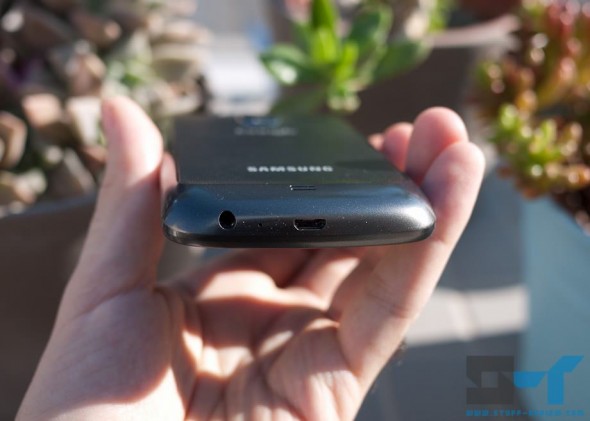
    • Samsung Galaxy Nexus bottom micro-USB and audio portsConnecting the Galaxy Nexus to your computer via MTP and the lack of USB Mass StorageDecember 10, 2011
    • Alex on:Manfrotto Nano VI and VII camera pouch review: budget, stylish protection for your mirrorless camera
    • gregori on:Manfrotto Nano VI and VII camera pouch review: budget, stylish protection for your mirrorless camera
    • dGs on:Galaxy Nexus drops 1.8m, joins the ranks of shattered glass-screened phones
    • adam capes on:I broke the Galaxy Nexus screen
    • Simon Tompkins on:Sony puts its WhiteMagic display technology to work in the Xperia P smartphone
  • Follow Us

    • Become our Facebook friend
    • Follow @suffreview on Twitter
    • Subscribe to our article RSS feed
    • Subscribe to our article RSS feed
    • Subscribe to our YouTube channel
  • Advertisment

  • Featured Articles

    • Google+, Google’s social gamble and why it might work this time
    • Audio-Technica ATH-ANC23 QuietPoint in-ear headphones review
    • Stuff-Review giveaway: win a B&N Nook Color, leather case and 4GB microSD card
    • Samsung Galaxy Nexus complete review
    • Apple’s Siri, Google Voice Actions, the past and the future of voice control
    • Amazon Kindle 7-inch Tablet, customized Android and $250 price tag
  • Latest Reviews

    • Retina iPad 3 & iPad 4 (2012) case review: Yoobao leather case
    • Manfrotto Nano VI and VII camera pouch review: budget, stylish protection for your mirrorless camera
    • Fujifilm FinePix X100 digital camera real world review
    • Galaxy Nexus case review: Case-Mate POP!
    • Galaxy Nexus case review: OtterBox Defender series case
    • iBooks Author hands-on: how anyone can now publish interactive books to the iPad
  • Home
  • Tagged: Picture Transfer Protocol
  • All
  • News
  • Reviews
  • Featured
  • Guides
  • Editorials
  • The Lab
  • Become our Facebook friendBecome our Facebook friend
  • Follow @stuffreview on TwitterFollow @stuffreview on Twitter
  • Subscribe to our YouTube channelSubscribe to our YouTube channel
  • See us on FlickrSee us on Flickr
  • Enjoy a more intimate experience on our TumblrEnjoy a more intimate experience on our Tumblr
  • Subscribe to our article RSS feedSubscribe to our article RSS feed

© 2009-2012 Stuff-Review. All rights reserved | privacy policy